
GS1-128 barcode parsing for handheld apps
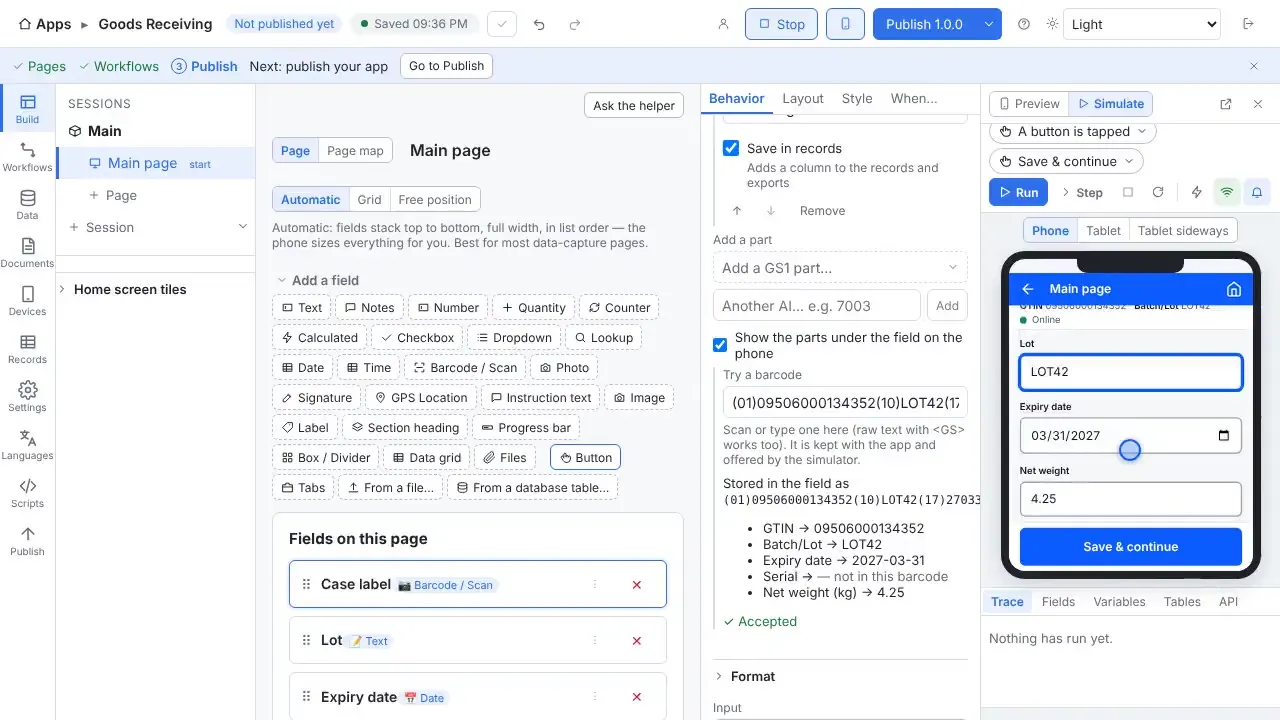
A supplier's GS1 case label carries the GTIN, lot, expiry date, net weight, serial number and more. StepVane reads each part into a named field, so one scan fills the whole form.
How it works
Parts of a barcode become fields
A GS1 label splits by itself into parts such as Lot, Use by and Net weight (kg), and each part can fill a field on the page.
Dates and weights come out right
Dates become real dates, weights become numbers with the decimal point where the label puts it, and check digits are checked.
Find the item either way
Look items up by GTIN: the product barcode (EAN-13) and the case label both find the same item.
Your own layouts too
Split your own codes at fixed positions, at a character such as a hyphen, or with a pattern.
Every part can be a column
Each part can be its own column in Records and in your exports.
Many symbologies
GS1-128, GS1 DataBar, GS1 QR code and GS1 DataMatrix are among the supported types.
Questions
- Can I try it without real labels?
- Yes. One click in Studio gives a PDF of test barcodes, including GS1-128 case barcodes with lot, expiry and weight, to print on any office printer.
- Does it work without Wi-Fi?
- Yes. Work is saved on the handheld first and uploads when the server can be reached again. The worker sees how much is waiting, and lookup tables stay on the device so scans are still checked against your data.
- Do I need a cloud account?
- No. The Windows PC that runs StepVane is the server, and the handhelds sync with it over your own network. There is no StepVane cloud account to create.
Watch how it is set up
Used in
Other integrations
Start with one device today
Free for Studio, one handheld and one worker. No cloud account, no credit card.